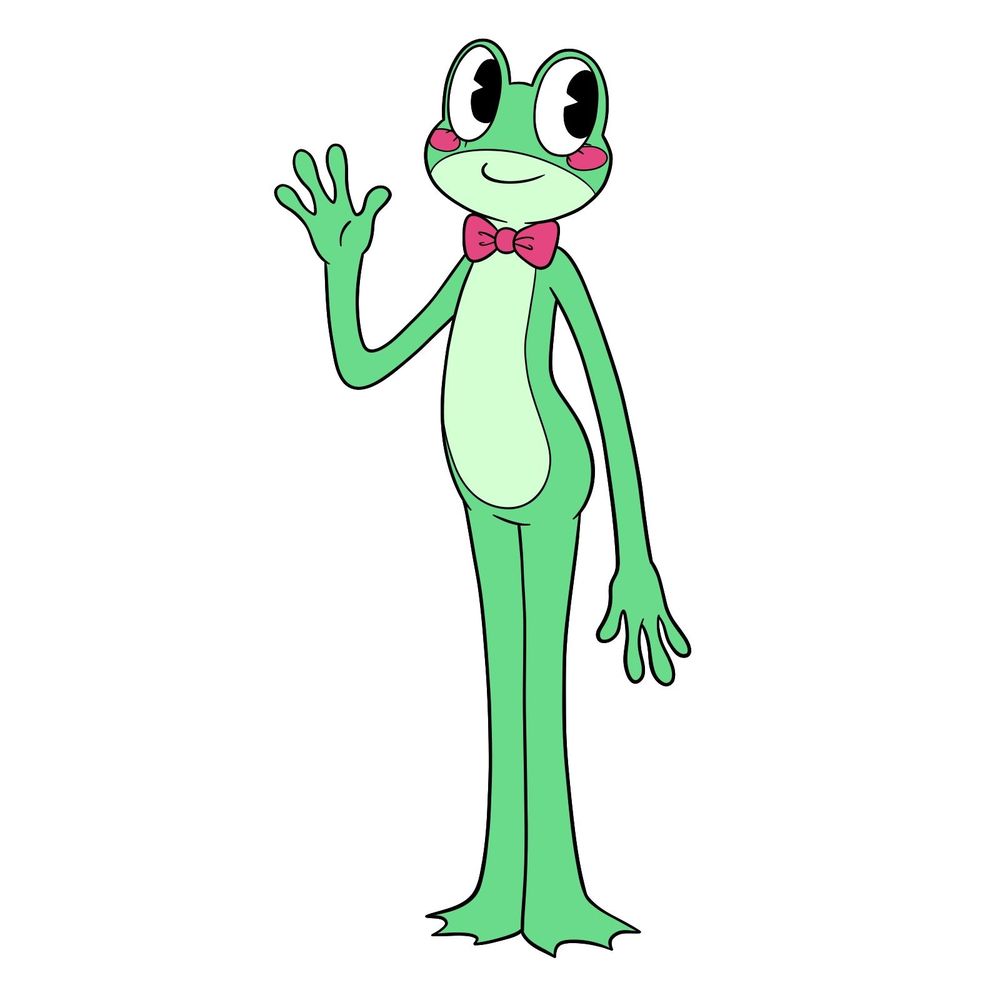
Ribbit only shows up in photos and flashbacks, but fans latched onto the lanky frog from The Amazing Digital Circus almost immediately. This guide covers how to draw Ribbit from The Amazing Digital Circus in her full-body form before she abstracted.
Putting Jax’s Old Friend on Paper
The tutorial has 14 step-by-step images total, with the last one showing the colored result. Ribbit’s design leans heavily on simple curved shapes and a lanky frame, so the construction lines at the beginning set up the proportions quickly. Most of the detail work comes down to getting the face right and nailing those long frog limbs.
Ribbit’s Design at a Glance
- Green frog body with light green belly patch
- Large black pie-slice eyes with eyelashes
- Pink round blush marks on cheeks
- Pink bow tie around the neck
- Long lanky arms with frog fingers
- Flat three-toed frog feet
Ribbit was close with Jax before everything went wrong, so drawing Jax next makes for a natural pair. Ragatha is another character with a relatively simple shape language, and Kinger rounds out the main cast nicely if you want to keep going.
Following the Color-Coded Lines
Each image uses three line colors to keep things organized:
- Red Color: lines added in the current step.
- Black Color: lines completed earlier.
- Gray Color: base sketch for structure.
Drawing Ribbit from TADC: Step-by-Step Tutorial


Share Your Ribbit Sketch!
That wraps up the frog who left the circus too soon. Drop a link to your finished drawing in the comments or share it on social media. For more TADC characters, Pomni and Zooble are both on the site and ready to sketch. Every new guide goes up on Facebook and Telegram the day it publishes, a fresh video hits YouTube daily, and Pinterest stays updated too. You can also support SketchOk on Patreon by grabbing hand-drawn coloring pages.