Home » Cartoon Characters » The Amazing Digital Circus

The NPC Nobody Expected: Drawing Ming from TADC

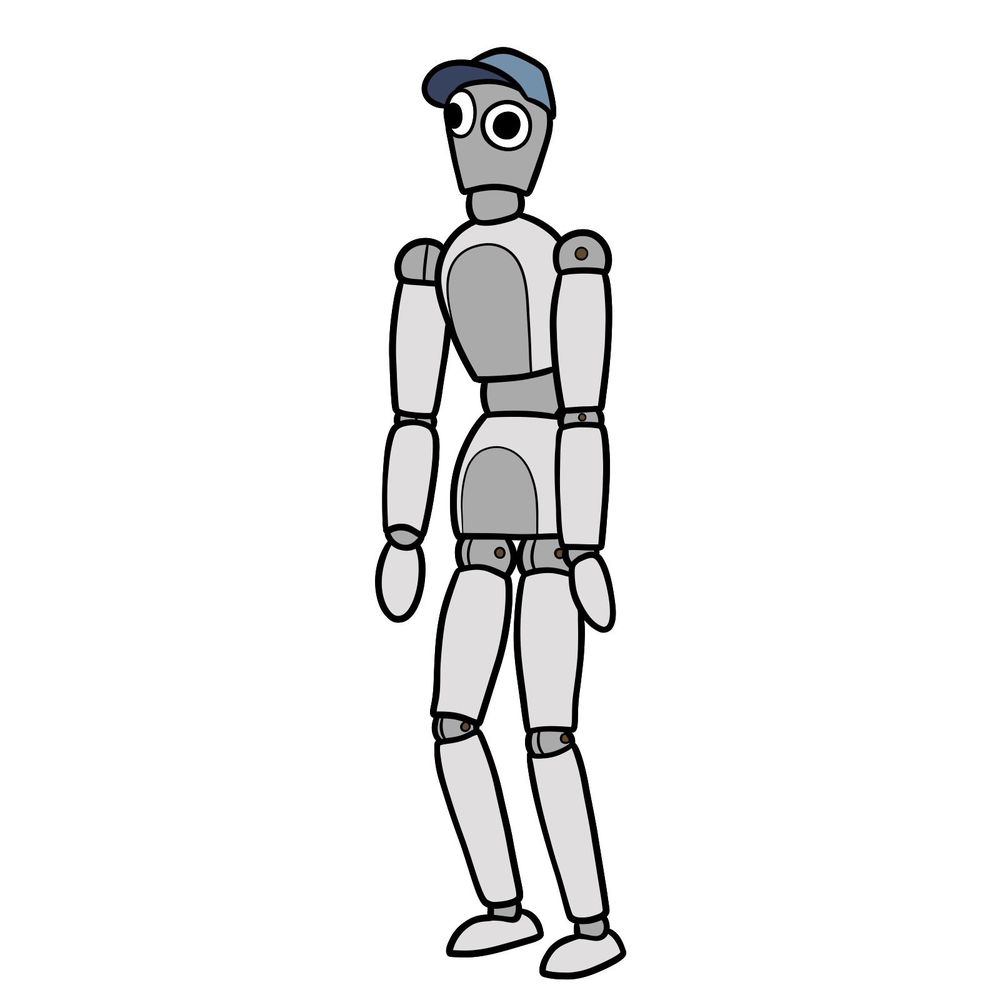
Caine built an entire mannequin just to deliver a punchline, and honestly that tracks. This tutorial walks through how to draw Ming, the mannequin NPC voiced by OneyNG who debuted in the sixth episode of The Amazing Digital Circus.

Caine’s Joke Mannequin on Your Sketchpad

The full drawing process covers 15 steps, with the final one being the colored version. Ming shares the same jointed mannequin body type as Abel, but the coloring, head shape, and accessories set them apart.

What Sets Ming Apart from Other Mannequins

  • Light blueish-grey mannequin body
  • Blue baseball cap tilted on head
  • Cartoonish googly eyes with black pupils
  • Visible ball joints at shoulders, hips, knees
  • Rounded fingerless hands

Ming shares a mannequin build with Abel, so drawing both back to back makes for a solid comparison. They appeared in the same episode as Pomni with a gun and armed Jax, both of which capture the chaos of They All Get Guns.

What the Three Line Colors Mean

Each step keeps things organized with a simple color system:

  • Red Color: lines added in the current step.
  • Black Color: lines completed earlier.
  • Gray Color: base sketch for structure.

Step-by-Step: How to Draw Ming from TADC

Step 01

How to draw Ming from The Amazing Digital Circus - step 01

Step 02

How to draw Ming from The Amazing Digital Circus - step 02

Step 03

How to draw Ming from The Amazing Digital Circus - step 03

Step 04

How to draw Ming from The Amazing Digital Circus - step 04

Step 05

How to draw Ming from The Amazing Digital Circus - step 05

Step 06

How to draw Ming from The Amazing Digital Circus - step 06

Step 07

How to draw Ming from The Amazing Digital Circus - step 07

Step 08

How to draw Ming from The Amazing Digital Circus - step 08

Step 09

How to draw Ming from The Amazing Digital Circus - step 09

Step 10

How to draw Ming from The Amazing Digital Circus - step 10

Step 11

How to draw Ming from The Amazing Digital Circus - step 11

Step 12

How to draw Ming from The Amazing Digital Circus - step 12

Step 13

How to draw Ming from The Amazing Digital Circus - step 13

Step 14

How to draw Ming from The Amazing Digital Circus - step 14

Step 15

Finished Ming drawing from The Amazing Digital Circus
Don't Miss New Tutorials! Follow SketchOk
I publish new step-by-step drawing guides every single day. Follow on your favorite platform so you never miss a tutorial. Thousands of artists are already drawing along and I can't wait you to join in!
PATREON
Love Drawing? Help Me Create More Tutorials
On my Patreon you can grab unique hand-made coloring pages: each one drawn by me personally. Every purchase directly supports the creation of new drawing tutorials. It's the best way to practice your skills, keep the site going, and get something truly original at the same time.
Get Coloring Pages on Patreon

The Punchline Is Your Finished Drawing

Ming is done, googly eyes and all. Drop a link to your sketch in the comments so everyone can see how it turned out. If you want to keep building out the TADC collection, Gummigoo is another NPC worth the effort, and Kinger brings a totally different shape language to the page. All new guides get shared on Facebook and Telegram as soon as they go live, a fresh video goes up on YouTube every day based on existing tutorials, and Pinterest stays updated regularly too. You can also support SketchOk by grabbing hand-drawn coloring pages on Patreon.

Disclaimer: All original artworks and photos used as references for the creation of these drawing tutorials are the property of their respective owners. If your work has been featured without proper credit, please kindly leave a comment below, and the issue will be promptly addressed. We greatly appreciate your exceptional art. Thank you.

Leave a Comment

FOLLOW