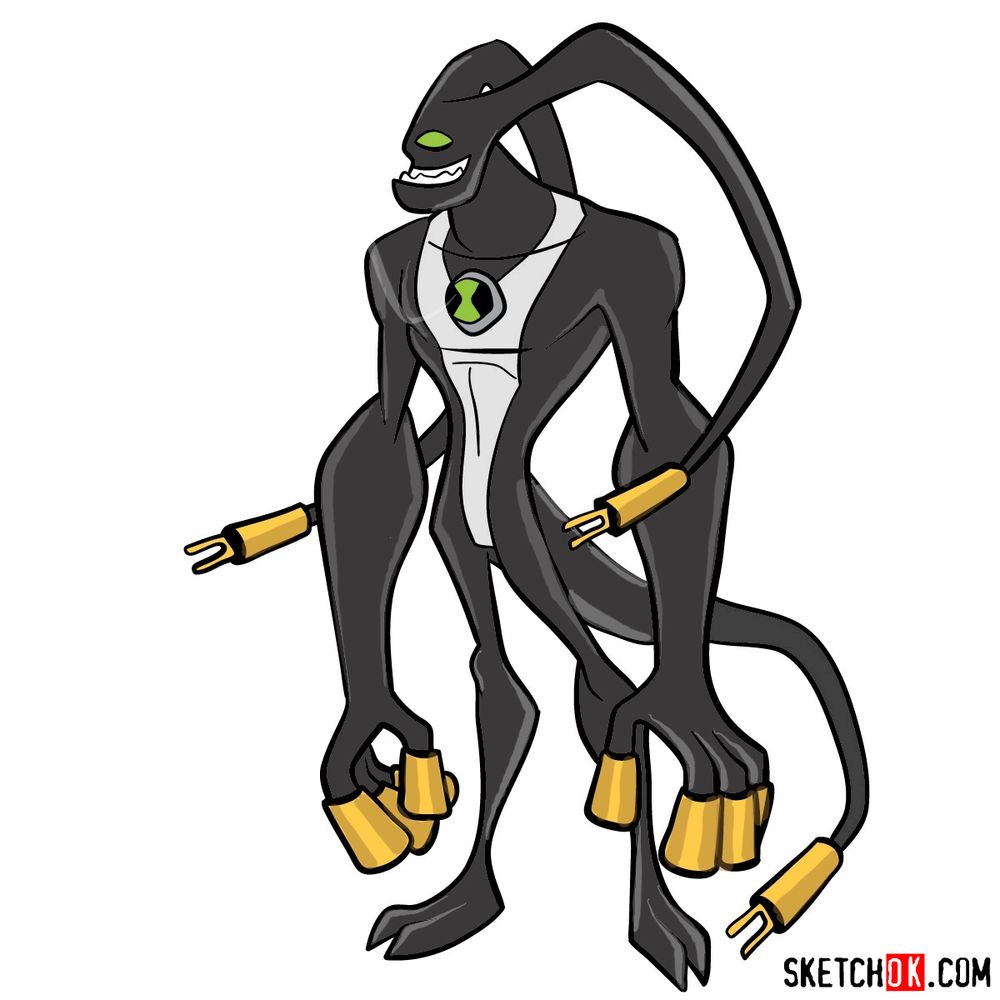
Young Ben’s favorite alien returns in Omniverse with a fresh look. This tutorial explains how to draw Feedback from Ben 10 Omniverse, the Conductoid who can absorb and redirect any form of energy. Feedback holds a special place in Ben’s heart as the alien he became obsessed with as a kid, leading to the Omnitrix temporarily removing access to this form. His unique design with antenna plugs and a tail makes him stand out among the roster.
Sketching Feedback Full Body
This guide breaks into 17 steps, covering Feedback’s sleek black body, golden plug fingers, and distinctive antenna that loop behind his head.
Feedback’s Design Features
- Elongated head with single green eye
- Wide toothy grin
- Two long antenna extending from head and looping back
- Black body with white chest stripe
- Omnitrix symbol on chest
- Slim torso and limbs
- Golden plug-shaped fingers on each hand
- Long tail with gold plug tip
- Digitigrade legs bending backward
- Split-toe feet with golden plugs
Getting Feedback right means nailing those looping antenna and plug details on his extremities. For other Omniverse aliens, the Rath tutorial shows a completely different body type to practice. Swampfire offers another alien with unique limb shapes, and the Ghostfreak guide provides a contrast with its floating supernatural design.
Color System for Steps
Follow your progress using these color indicators:
- Red Color: lines added in the current step.
- Black Color: lines completed earlier.
- Gray Color: base sketch for structure.
How to Draw Feedback: Complete Step-by-Step


Show Off Your Feedback Drawing!
That wraps up this guide on how to draw Feedback from Ben 10 Omniverse. Did the antenna loops and plug fingers turn out well? Leave a comment with your thoughts or share a link to your artwork if you posted it somewhere online. Comparing different takes on this energy-absorbing alien is always fun, and community feedback helps everyone get better at drawing these Omniverse designs.